
Executive summary slide in one answer
An executive summary slide is slide 2 of a deck. It gives the answer as a full-sentence title, 2 to 4 facts with numbers that prove it, and the decision you need from the room. Our rule: 50 words or fewer on the slide. All six real examples below fit it.
A reader who sees only this slide should know the news and what you want from them. The rest of the deck is the proof.
Below are six real summary slides made with GenPPT, six layouts you can copy, a before and after for the word count, and a fill-in template. For the full consulting deck method (action titles on every slide, the Pyramid Principle, ghost decks), read our guide to McKinsey slides.
What goes on an executive summary slide
Five parts. Most summary slides need the first two and the fourth. Add status and a recommendation when you bring bad news.
 12345
- 1
Action title: The answer as a full sentence. A reader who stops here still knows the news.
- 2
Evidence: Two to four facts that prove the title, each with a number.
- 3
Status: One word and one colour, so the room sees the state at once.
- 4
Decision needed: What you want from the meeting, as a verb: approve, fund, choose.
- 5
Recommendation: Your pick, with its cost and what it keeps.
- Action title. One sentence that states the answer. It has a verb and, where you can, a number or a date.
- Evidence. Two to four facts. Each fact has a number and a comparison, so the reader can judge it: 7.4% no-shows vs an 8% goal.
- Status. For a project: one word and one colour. Write the word too, because some readers cannot tell red from green.
- Decision needed. What you want from the meeting. Start with a verb: approve, fund, choose, sign off.
- Recommendation. Your pick, with its cost and what it keeps. The room decides faster when you give one.
What does not go on it: the agenda, background everyone knows, methods, and every number you have. Those go on later slides or in the appendix.
6 real executive summary slide examples
Each slide is slide 2 of a real GenPPT example deck. Each prompt asked for a summary on slide 2. In three decks the first render used the deck title as the headline, and one follow-up message replaced it with a sentence. Select a slide to see the full deck, the prompt and any follow-up.
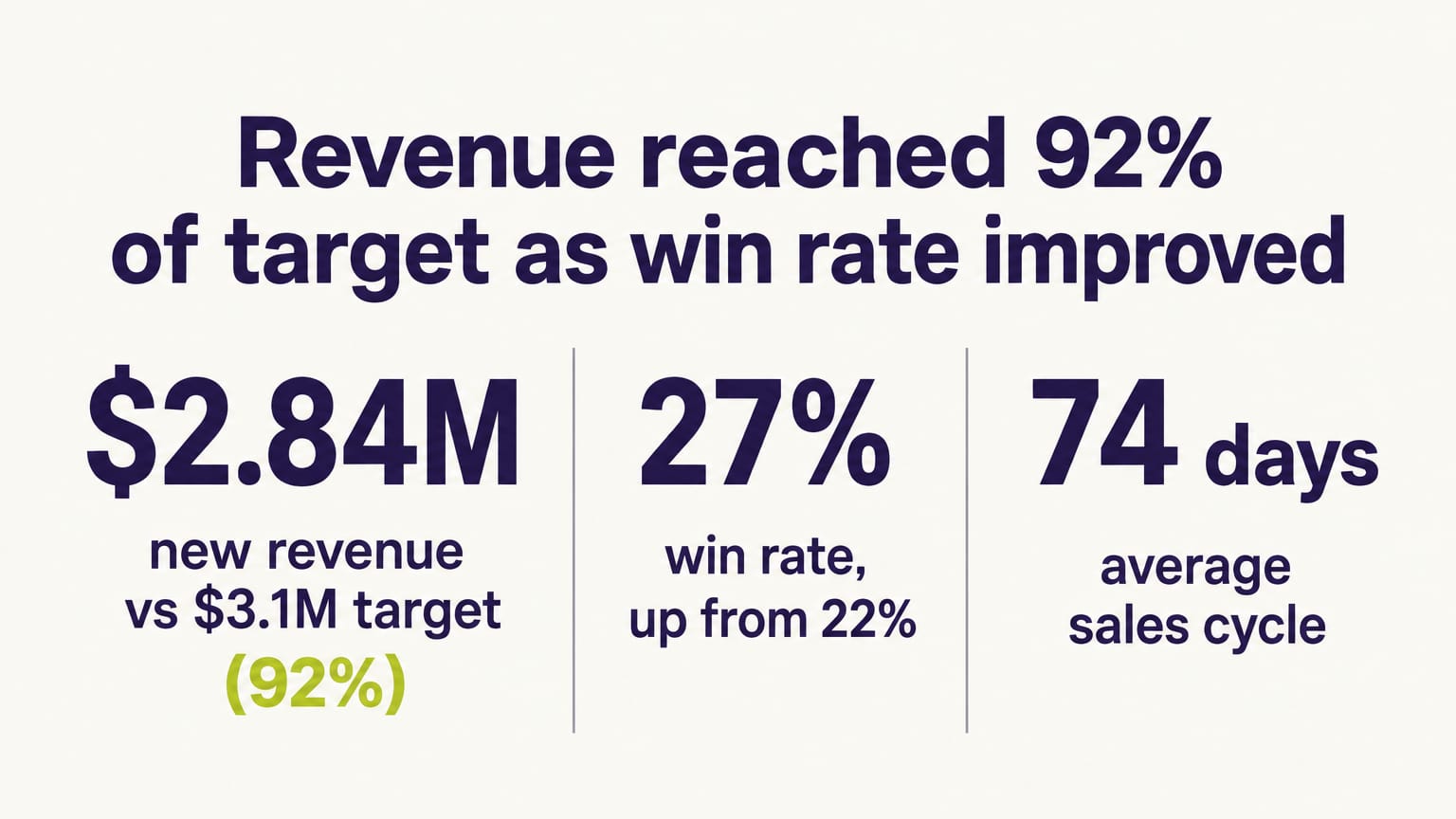 Three big numbers27 wordsInternal sales QBR for leadershipSee all 9 slides
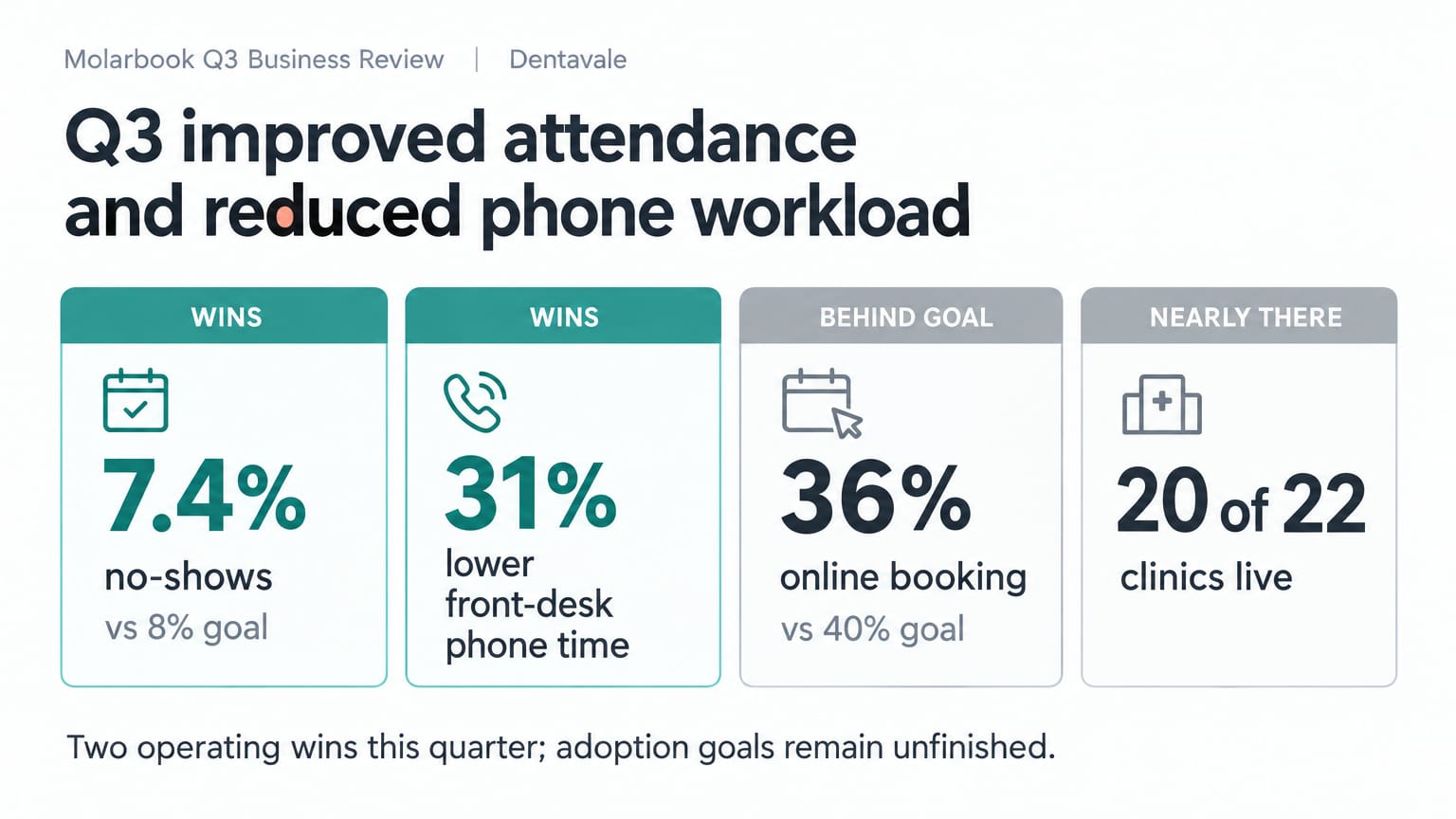 Four KPI cards48 wordsCustomer QBR from a software vendorSee all 9 slides
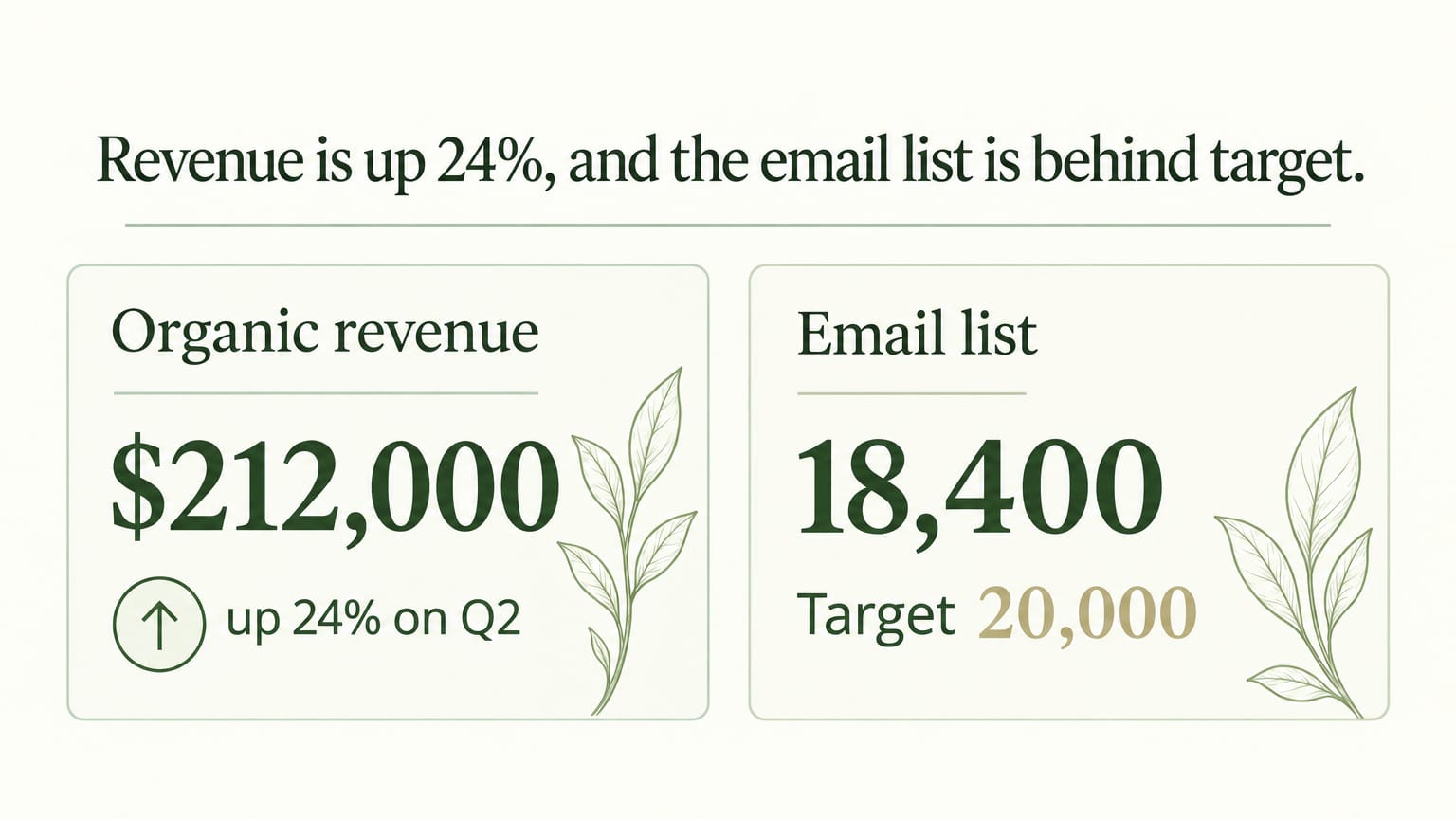 Two numbers23 wordsAgency QBR for a clientSee all 8 slides
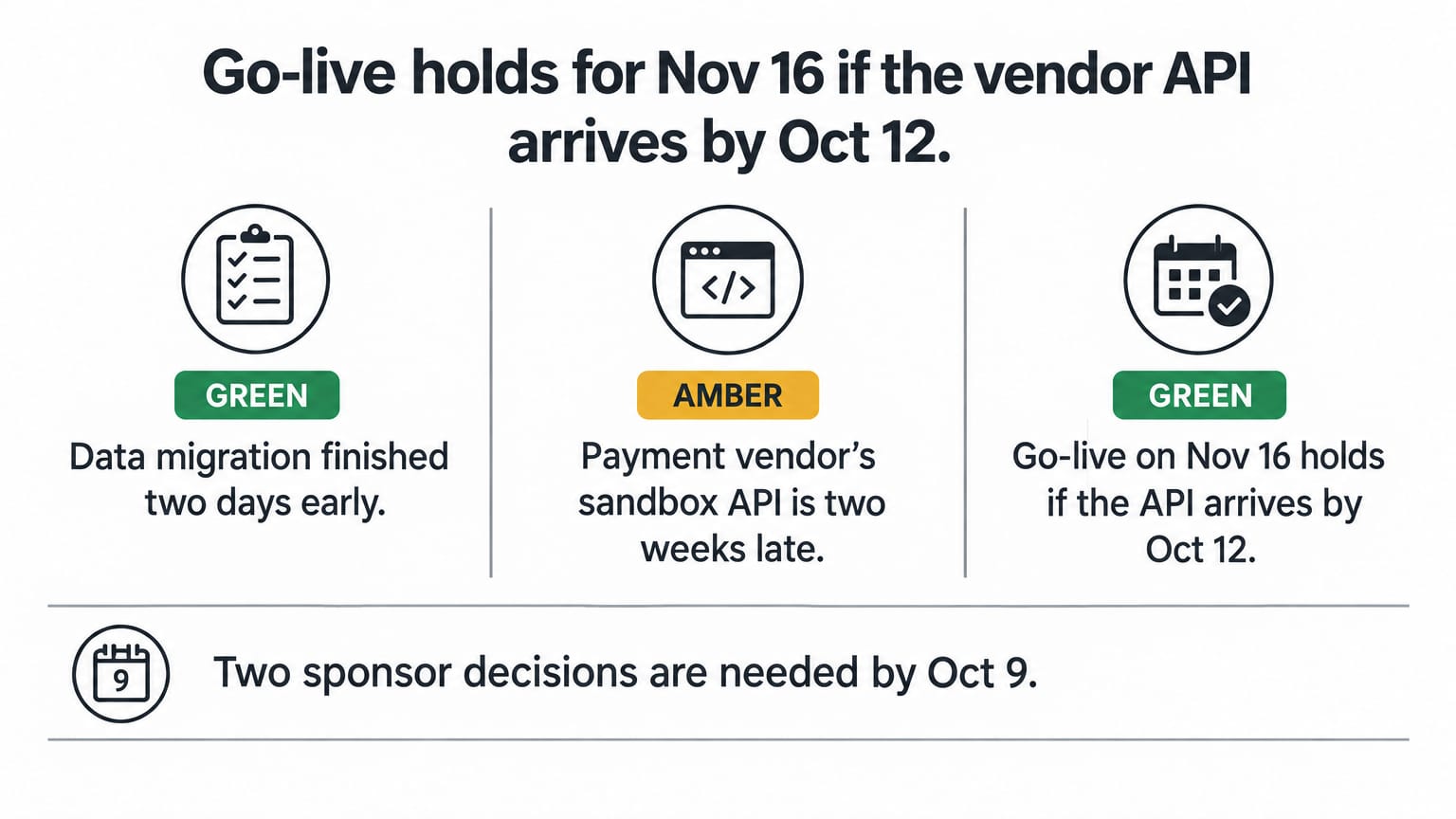 3 columns with status50 wordsWeekly project status reportSee all 8 slides
- Split and decision50 wordsSteering committee update with a red statusSee all 9 slides
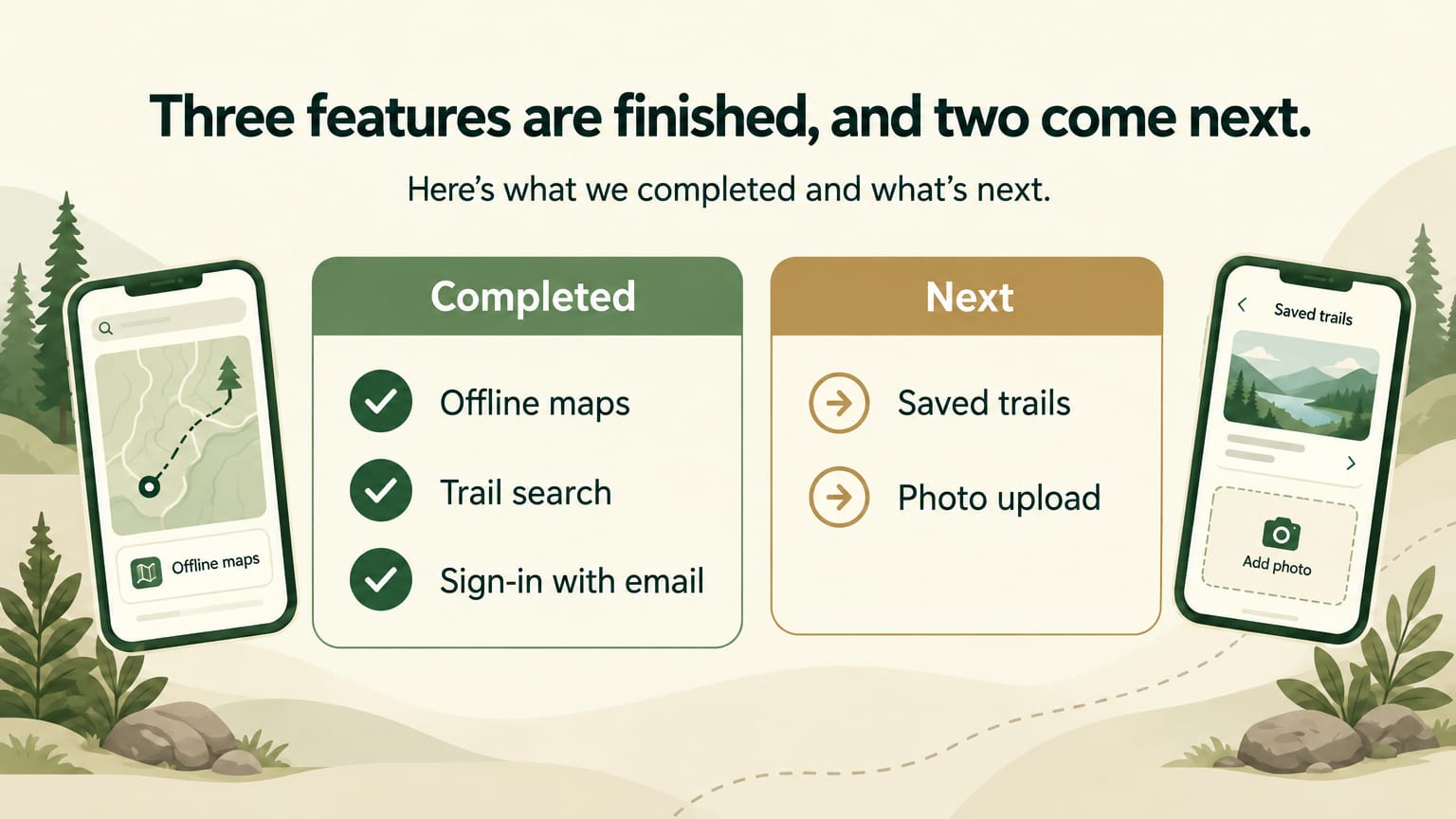 Done and next28 wordsClient status report for an app buildSee all 8 slides
What they have in common:
- Every title is a sentence with a verb. None of them says "Executive summary" or "Overview".
- Most numbers sit next to a comparison. $2.84M is next to the $3.1M target. 18,400 subscribers is next to the 20,000 target.
- Bad news is on the slide. The customer review marks online booking as behind goal. The steering update puts at risk in red.
- The status updates end with the ask. "Decision needed: approve Option C." "Two sponsor decisions are needed by Oct 9."
- Word counts run from 23 to 50. We counted every word on each slide, numbers included, and skipped the small text inside the phone pictures.
6 executive summary layouts to copy
Pick the layout from the shape of your news, not from a template gallery. These six cover most reviews, status updates and board decks.
Organic visits beat target, and the email list is 1,600 short
86,000
organic visits
target 80,000
$212,000
organic revenue
up 24% on Q2
18,400
email subscribers
target 20,000
Decision: move $1,500 a month from gift pages to video.
3-column
Use when: You have three results of equal weight.
Numbers from the Agency QBR for a client example.
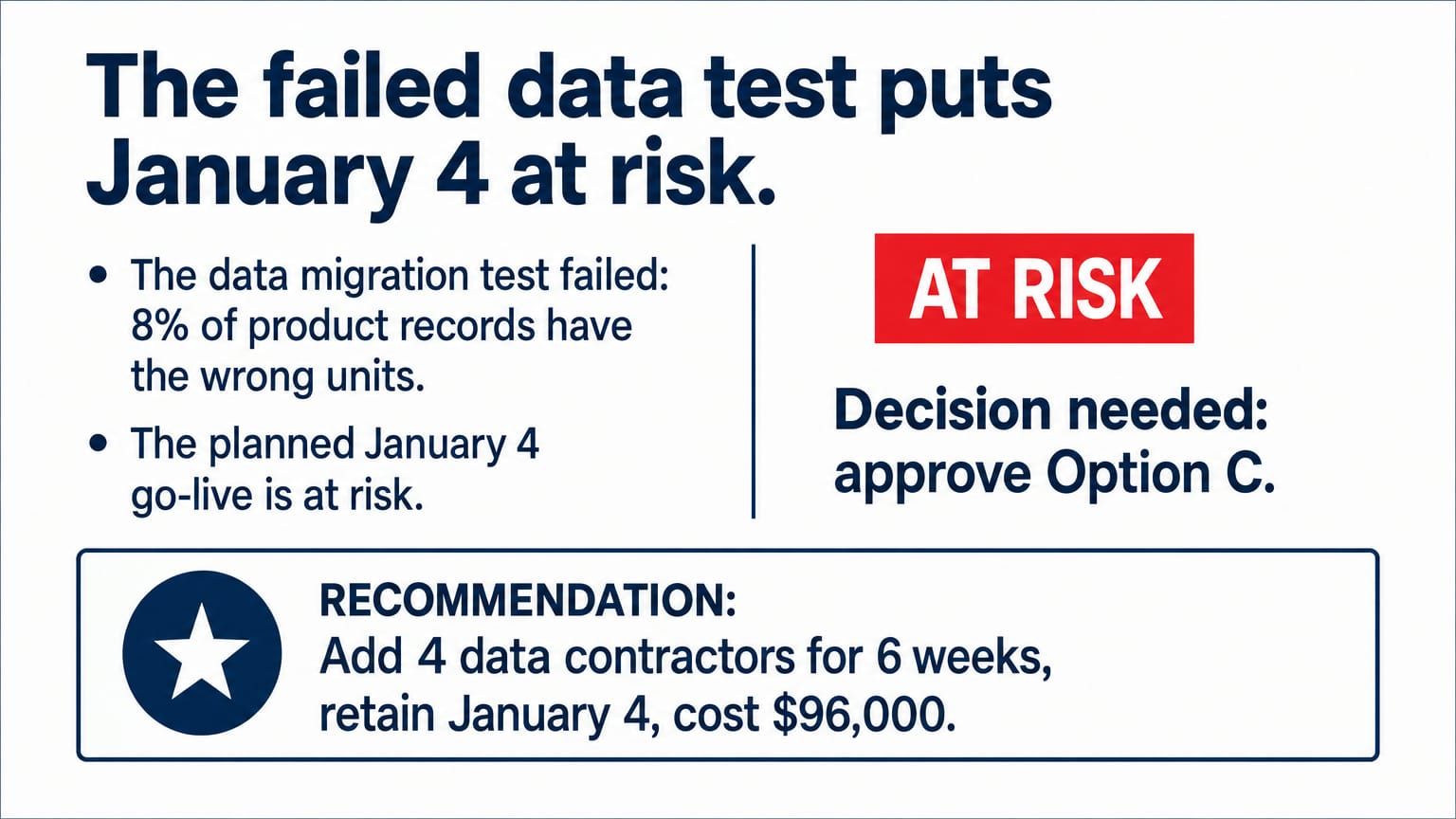
Add 4 data contractors to keep the January 4 go-live
- Data test failed: 8% of product records have the wrong units.
- Warehouse is 3 weeks late.
- Finance and purchasing are on plan.
Our pick: option C
4 data contractors for 6 weeks. Keep January 4.
$96,000
Split screen
Use when: You bring bad news and one recommendation.
Numbers from the Steering committee update with a red status example.
Q3 beat the no-show goal, and 2 clinics still need to go live
7.4%
no-shows
goal 8% or less: met
36%
online booking
goal 40%: behind
20 of 22
clinics live
goal 22: behind
−31%
front-desk phone time
no goal set
4-quadrant KPI
Use when: Four metrics, each with its own goal.
Numbers from the Customer QBR from a software vendor example.
Go-live holds for Nov 16 if the vendor API arrives by Oct 12
- SData migration finished two days early.
- CThe payment vendor's sandbox API is two weeks late.
- QCan go-live still happen on Nov 16?
- AYes, if the API arrives by Oct 12. We need 2 decisions by Oct 9.
SCQA
Use when: The room needs the story before the answer.
Numbers from the Weekly project status report example.
Q4 pipeline is 3.1 times the target
$9.6M
Q4 pipeline
Forecast: $3.3M
Main risk: two large deals need legal approval.
One number
Use when: One number decides the meeting.
Numbers from the Internal sales QBR for leadership example.
Sprint 6 is green, and we need three things from you
- 1App store account accessFeb 6
- 2Final trail photosFeb 13
- 3A decision on a paid tierOpen
Ask list
Use when: The job of the meeting is to get answers from the room.
Numbers from the Client status report for an app build example.
| Your news | Layout | Example title |
|---|---|---|
| Three results of equal weight | 3-column | Organic visits beat target, and the email list is 1,600 short |
| A problem and your fix | Split screen | Add 4 data contractors to keep the January 4 go-live |
| Four metrics with goals | 4-quadrant KPI | Q3 beat the no-show goal, and 2 clinics still need to go live |
| A change the room has not heard of yet | SCQA | Go-live holds for Nov 16 if the vendor API arrives by Oct 12 |
| One number decides it | One number | Q4 pipeline is 3.1 times the target |
| You need answers from the room | Ask list | Sprint 6 is green, and we need three things from you |
The 50-word rule
Our rule for a summary slide: 50 words or fewer, title included. It is our rule, not a standard. We use it because a slide with more words than that turns into a page the room reads while you talk.
Here is the same quarter twice. On the left, a bullet-list summary with a topic label for a title. On the right, the real GenPPT slide from the same facts.
Before: 95 words
Executive summary
- Q3 new revenue for the EMEA region was $2.84M against a target of $3.1M, so we reached 92% of the target.
- Our win rate improved from 22% last quarter to 27% this quarter, helped by the returns feature and a faster trial.
- The average sales cycle was 74 days.
- The Q4 pipeline is $9.6M, which is 3.1 times the target.
- We lost two deals on price to a cheaper rival and one on a missing customs feature.
- Next steps include a mid-market price tier, a shorter security review and one more solutions engineer.
Built in code for this page. The title is a topic label, so the reader has to find the point.
After: 27 words
Real GenPPT slide. The losses and next steps move to their own slides later in the deck.
How to cut a summary to 50 words:
- Write the title first. If the title says the answer, many of the bullets are no longer needed.
- Keep facts with numbers. Drop sentences that only explain or set context.
- Turn each sentence into a number and a label. "Our win rate improved from 22% to 27%" becomes 27% win rate, up from 22%.
- Move the reasons to their own slides. Wins, losses and next steps each get a slide later in the deck.
- Count. Every number is one word. If you are over 50, cut a fact, not the decision.
SCQA: write the summary in four lines
When the news needs context, write four lines before you design anything:
- Situation: what everyone in the room already accepts.
- Complication: what changed.
- Question: what the room now needs to know.
- Answer: your answer. This becomes the slide title.
The method comes from Barbara Minto, who joined McKinsey in 1963 and published The Pyramid Principle in 1985 (Wikipedia). Her own site calls it the Situation, Complication, Question framework and uses it to find "the question in your reader's mind" (barbaraminto.com). Her pyramid puts the ideas "under a single point": that point is the answer, so many guides write the four steps as SCQA.
The SCQA layout above puts all four lines on the slide. You can also use them only as a draft: the answer becomes the title and the complication becomes the first fact.
Executive summary slide template
Copy this, fill in the brackets, and delete any line you do not need.
Title: [The answer in one sentence, with a verb and a number or date]

Fact 1: [Number] [what it measures], vs [target / goal / last period]
Fact 2: [Number] [what it measures], vs [target / goal / last period]
Fact 3: [Number] [what it measures], vs [target / goal / last period]

Status: [Green / Amber / Red], written as a word too
Decision needed: [Verb] [what], by [person], by [date]
Recommendation: [Your pick], [cost], [what it keeps]
Count the words when you are done. Then check: can someone who reads only this slide tell what happened and what you need from them?
To get the slide designed, paste your filled template or your full report into GenPPT and ask for an executive summary slide. Paid plans can export the deck as an editable PowerPoint file from the Export menu; the export runs in a queue and arrives by email.
Action title formulas for a summary slide
Four of the six real titles above make good formulas. Swap in your own numbers.
| Formula | Real title from the examples |
|---|---|
| [Result] as [driver] | Revenue reached 92% of target as win rate improved |
| [Good news], and [bad news] | Revenue is up 24%, and the email list is behind target |
| [Plan] holds if [condition] by [date] | Go-live holds for Nov 16 if the vendor API arrives by Oct 12 |
| [Problem] puts [date or goal] at risk | The failed data test puts January 4 at risk |
The "good news, and bad news" formula is useful for reviews: it shows the room you are not hiding the miss. For more title patterns, see the action titles section of our McKinsey slides guide.
Common executive summary slide mistakes
- A topic label as the title. "Executive summary" or "Q3 overview" tells the reader nothing. Write the answer.
- An agenda in disguise. "We will cover revenue, pipeline and risks" is a list of topics, not a summary.
- Numbers with no comparison. "$2.84M revenue" is good or bad only next to a target or last quarter.
- Hiding the miss. If a goal was missed, say so on this slide. The room will find it later in the deck anyway.
- No ask. If you need a decision, put it on the summary slide, with a date.
- Writing it first. Write the summary last, after the body slides, so it matches what the deck proves. Then put it second.
FAQ
What is an executive summary slide?
It is the slide right after the cover that gives the whole deck in one slide: the answer as the title, two to four facts with numbers, and the decision you need. A reader who sees only this slide should know the news.
How many words should an executive summary slide have?
We use 50 words or fewer, title and numbers included. That is our rule, not a standard. The six real GenPPT examples on this page have 23 to 50 words.
Where does the executive summary slide go in a deck?
Right after the cover, as slide 2. Put the agenda after it, if you need one. Write it last, after the body slides.
How many points should an executive summary slide have?
Two to four facts, plus one decision or ask. If you have more than four, group them or move them to the body.
What is the difference between an executive summary slide and an agenda slide?
An agenda lists the topics you will cover. An executive summary gives the conclusions. "Revenue, pipeline, risks" is an agenda. "Revenue reached 92% of target as win rate improved" is a summary.
Can I make an executive summary slide with AI?
Yes. Paste your report or notes into GenPPT and ask for an executive summary slide with an action title, three numbers and the decision you need. Read every number on the slide against your source before you present it.