
Fonts that work in PowerPoint, Keynote and Google Slides
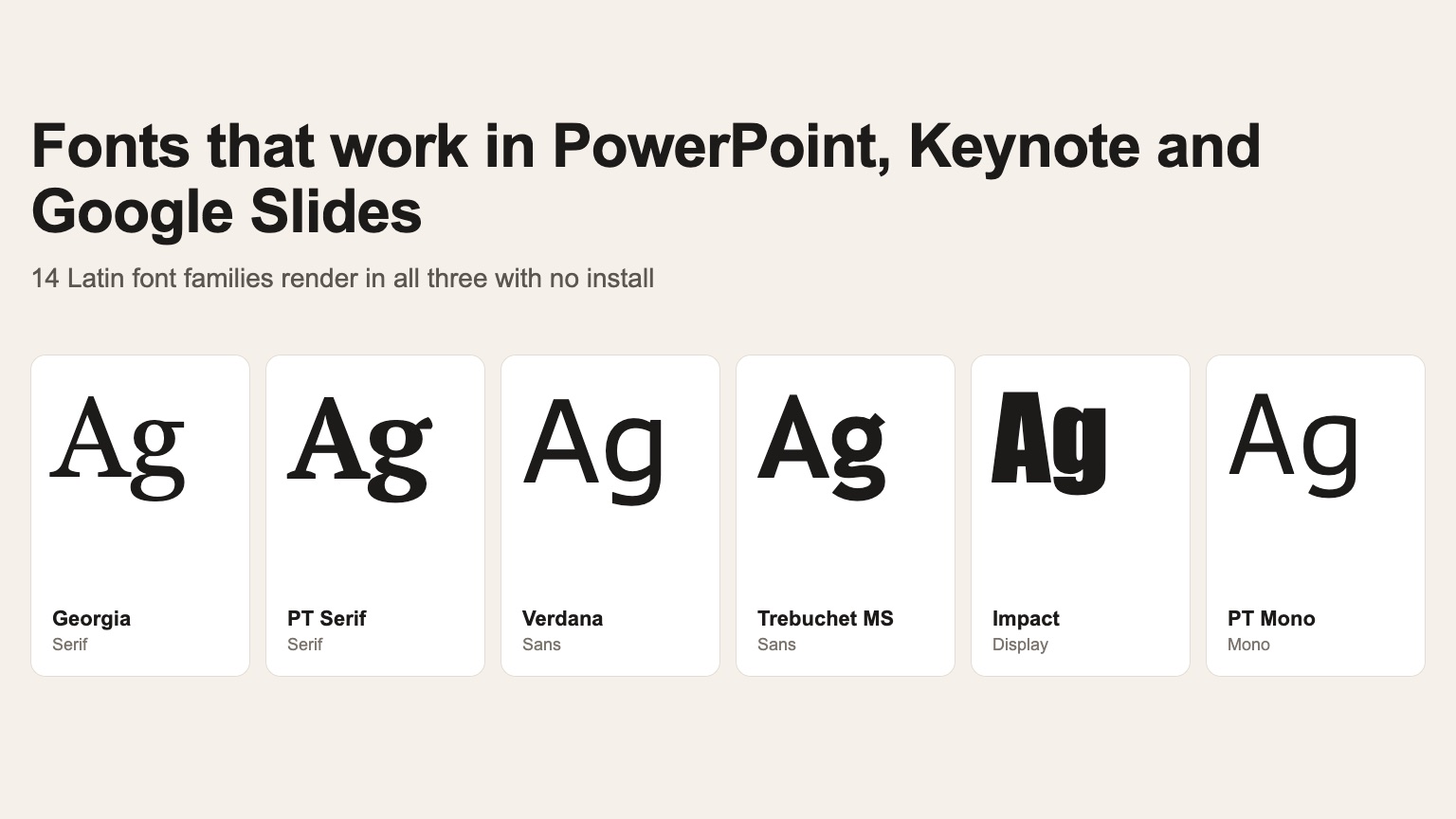
14 Latin font families render in all three apps with no install and no fallback: Georgia, PT Serif, PT Serif Caption and Times New Roman (serif); Arial, Verdana, Trebuchet MS, PT Sans, PT Sans Caption and PT Sans Narrow (sans serif); Impact (display); Courier New and PT Mono (mono); and Comic Sans MS. For headings, use Georgia (it beat Cormorant Garamond and Playfair Display in our Keynote and Google Slides renders) or PT Serif Bold when the title has numbers. For body text, use Verdana, Arial or Trebuchet MS.
Most "best PowerPoint fonts" lists pick fonts that look good. Few check whether the font exists on the other side. Send a deck to someone on a Mac, or import it into Google Slides, and a missing font gets swapped for another one. Titles wrap, numbers shift, and the look is gone.
So we compared the actual font lists of the three apps on 27 November 2026: Microsoft's Office cloud font catalog (638 families), the fonts preinstalled on macOS 27.2 that Keynote can use (302 families), and the fonts Google Slides offers (1,974 families). Then we rendered real decks in Keynote and Google Slides to see which serif headings held up.
The 14 Fonts That Work in PowerPoint, Keynote and Google Slides
"Works" here means three things. The font is in Microsoft's Office cloud catalog, so PowerPoint in Microsoft 365 downloads it when a file uses it. It ships with macOS, so Keynote has it on any Mac. And Google Slides offers it by the same name.
| Font | Style | Best for | Why |
|---|---|---|---|
| Georgia | Serif | Headings | Our best-scoring serif heading in Keynote and Google Slides. Old-style digits. |
| PT Serif | Serif | Headings with numbers, body | Bold weight, italics, and lining digits that sit on the line. |
| PT Serif Caption | Serif | Small text | A sturdier cut of PT Serif for small sizes. Regular weight only. |
| Times New Roman | Serif | Formal or academic decks | Lining digits and bold. Reads like a printed paper. |
| Arial | Sans | Body, labels, tables | The default fallback almost everywhere, so it never changes. |
| Verdana | Sans | Body text, small sizes | Wide letters and large lowercase. Easy to read from the back of a room. |
| Trebuchet MS | Sans | Headings, body | A little more character than Arial, with bold and italics. |
| PT Sans | Sans | Body | Pairs with PT Serif. Check title line positions (see fonts to avoid). |
| PT Sans Caption | Sans | Small labels | Wider spacing for small text. No italics. |
| PT Sans Narrow | Sans | Tables, long labels | Fits more words per line. No italics. |
| Impact | Display | One big word or number | Very heavy and condensed. Regular weight only, no italics. |
| Courier New | Mono (slab) | Code, typewriter look | Every character is the same width. |
| PT Mono | Mono | Code, data | A cleaner monospace than Courier New. No italics. |
| Comic Sans MS | Handwriting | Kids and classroom decks | Safe everywhere, but it reads as casual. |
What about the other 90 of the 104? They are Noto fonts for scripts such as Avestan, Coptic, Javanese and Old Persian. They have no Latin digits, so they are no use for an English deck. They are in the CSV download if you need one of those scripts.
There is no safe slab serif. Courier New is the only slab in all three, and it is monospaced. For a proportional slab, Roboto Slab and Aleo are in Office's cloud fonts and in Google Slides. Mac users have to install them.
Same Title, Four Serif Fonts
Old-style digits look elegant in a paragraph. On a title slide they can look like a typo. In our editable PowerPoint examples, the big "180" on the history deck reads more like "I8o" in Cormorant Garamond. If a heading carries a year, a price or a count, use PT Serif Bold or Times New Roman Bold.
Best Fonts for PowerPoint
Microsoft keeps its Office fonts in the cloud. Its support page on embedding fonts says cloud fonts "will automatically download if they're not already installed on the machine that opened the file." The catalog we read, version 4.42, lists 638 families.
That makes PowerPoint the most generous of the three apps after Google Slides. The catch is the other apps:
- Aptos, the default font in Microsoft 365, is a cloud font. It is not in Google Slides and not on a Mac.
- Calibri and Cambria are in Office and in Google Slides, but not preinstalled on macOS. Keynote on a stock Mac swaps them for another font.
- Segoe UI, Century Gothic and Franklin Gothic are Office-only.
If your audience uses PowerPoint and Google Slides but not Keynote, you have 255 families to choose from: the 104 in all three plus 151 in both Office and Google Slides. The best known:
| Style | In PowerPoint (cloud) and Google Slides |
|---|---|
| Sans | Lato, Roboto, Open Sans, Montserrat, Poppins, IBM Plex Sans, DM Sans, Work Sans, Nunito, Fira Sans, Barlow, Karla, Libre Franklin, Calibri |
| Serif | Lora, Merriweather, EB Garamond, Libre Baskerville, IBM Plex Serif, DM Serif Display, Noto Serif, Cambria |
| Slab | Roboto Slab, Aleo, Josefin Slab |
| Display | Oswald, Bebas Neue, Abril Fatface, Anton, Lobster |
| Mono | Roboto Mono, Source Code Pro, IBM Plex Mono, Fira Code, Inconsolata, Consolas |
Mac users can install any of these for free from Google Fonts, except Calibri, Cambria and Consolas, which are Microsoft fonts.
Best Fonts for Keynote (and macOS)
Keynote uses the fonts on the Mac it runs on. A fresh install of macOS 27.2 has 302 families in its system font folders. When a .pptx names a font the Mac does not have, Keynote draws the text in another one.
We measured how much that costs. We exported four serif GenPPT decks to .pptx and opened each in Keynote twice: once with every font installed, and once as a stock Mac would see it, with all non-macOS fonts missing. We scored each render against the original slide as the mean pixel difference at 960 px wide. Lower is better.
Keynote on a stock Mac, title regions, mean of 4 serif decks
- Cormorant Garamond (missing on a stock Mac)44.94
- Playfair Display Bold (missing on a stock Mac)43.92
- PT Serif Bold (preinstalled)37.30
- Georgia (preinstalled)34.13
Many Mac favorites are Mac only. Helvetica, Helvetica Neue, Avenir Next, Futura, Optima, Palatino, Didot, Baskerville, Hoefler Text and Menlo are in neither Office's cloud catalog nor Google Slides. If a Keynote deck uses them and you send a .pptx, PowerPoint and Google Slides will swap them.
A few Mac fonts are also in Office's cloud catalog but not in Google Slides: Gill Sans, Rockwell, Tahoma, Arial Black, Arial Narrow and Arial Rounded MT Bold. They are safe between Keynote and PowerPoint only.
Best Fonts for Google Slides
Google Slides offers 1,974 families: all 1,961 families on Google Fonts, plus 13 that Slides adds on its own (Arial, Calibri, Cambria, Comic Sans MS, Consolas, Corsiva, Courier New, Georgia, Impact, Proxima Nova, Times New Roman, Trebuchet MS and Verdana). Open the font menu and click More fonts to add any of them.
When Slides imports a .pptx, the font name has to match exactly. We saw this with Source Serif: Office's cloud catalog calls it Source Serif Pro, while Google Fonts renamed it Source Serif 4. A .pptx that asked for Source Serif Pro came out in Arial in Google Slides. The same text written as Source Serif 4 rendered correctly. Source Sans Pro and Source Sans 3 have the same split.
In our Google Slides renders of the same four serif decks, Georgia scored best again: 36.55 on the title regions, against 41.93 for PT Serif Bold, 42.62 for Playfair Display Bold and 38.05 for the Cormorant Garamond export we shipped before.
For the best fonts for Google Slides alone, any Google Font works. If the deck will ever go back to PowerPoint, pick from the 255 families in the PowerPoint list above. If it may go to a Mac, pick from the 14.
Fonts to Avoid in a Shared Deck
| Font | The problem | Use instead |
|---|---|---|
| Cormorant Garamond | Google Slides only. Old-style digits. Thin at heading sizes. | Georgia (our measured best), or PT Serif Bold for numbers |
| Playfair Display | Not on a Mac. Old-style digits. Scored worse than Georgia in Google Slides on all 4 decks. | Georgia |
| Inter | In Google Slides, but not an Office cloud font and not preinstalled on a Mac. | Arial or Verdana, or install Inter on every machine |
| Helvetica, Helvetica Neue | Mac only. | Arial |
| Aptos | Office only. | A font from the 14, or Lato for PowerPoint and Google Slides |
| Merriweather | Not on a Mac. Once installed, Keynote drew it 0.24 em lower than the frame we set, because it reads a different height value from the font file. | PT Serif or Georgia |
| PT Sans (titles) | Two builds. The one in macOS has a line height value (hhea ascent) of 0.900 em, the Google Fonts build 1.018 em. Keynote and Google Slides place the first line 0.12 em apart. | Fine for body text. For titles, Arial or Trebuchet MS |
| Source Serif Pro | Google Slides does not know this name and shows Arial. | Source Serif 4 in Google Slides |
| Lato italics in Keynote | Keynote showed Lato italic runs from a .pptx as upright text in our tests. | Another family for italic callouts |
| Raleway | Old-style digits by default. | Montserrat or Lato for headings with numbers |
Similar Fonts: Safe Swaps for Popular Fonts
Looking for a similar font that will not break? These swaps keep the look close and land on a font the other app has.
| If you use | Missing in | Swap to | Note |
|---|---|---|---|
| Helvetica, Helvetica Neue | PowerPoint, Google Slides | Arial | Arial has the same character widths as Helvetica, so lines break in the same place. |
| Cormorant Garamond, Garamond | Keynote, PowerPoint (Cormorant) or Google Slides (Garamond) | Georgia | Measured best in Keynote and Google Slides. EB Garamond works in PowerPoint and Slides. |
| Playfair Display | Keynote | Georgia | Both are high-contrast serifs. |
| Baskerville | PowerPoint, Google Slides | Libre Baskerville | In Office's cloud catalog and Google Slides. Install it on the Mac. |
| Inter | PowerPoint, Keynote | Arial or Verdana | Or install Inter everywhere. It is free on Google Fonts. |
| Calibri | Keynote | Carlito on the Mac | Carlito has Calibri's widths. It is on Google Fonts, not in Office's catalog. |
| Source Serif Pro | Google Slides | Source Serif 4 | Same family, newer name. |
| Aptos | Keynote, Google Slides | Arial or Lato | Lato is in Office and Google Slides. |
Font Pairings From the Safe List
Every pair below is in all three apps, so a deck set in it looks the same in PowerPoint, Keynote and Google Slides.
| Heading | Body | Why it works |
|---|---|---|
| Georgia | Verdana | Both were drawn by Matthew Carter for screens. Classic and easy to read. |
| PT Serif Bold | PT Sans | Made by ParaType as one family. Lining digits in the headings. |
| Georgia | Arial | An editorial heading over a plain body. Hard to get wrong. |
| Trebuchet MS Bold | Georgia | A friendly sans heading with a serif body for reading decks. |
| Impact | Arial | For one huge number or word per slide, with plain text under it. |
| Times New Roman Bold | Arial | Formal and academic. Lining digits in both. |
| Arial Bold | PT Mono | Technical decks with code, commands or data. |
Font pairing rules still apply: one serif and one sans, or one family in two weights. Keep the body at 18 pt or more for a projected deck.
How GenPPT's Editable PowerPoint Export Picks Fonts
GenPPT draws each slide as one finished picture. The Editable PowerPoint (.pptx) export rebuilds that picture as real text boxes, native charts and art behind the text. You can see three of them, with downloads, in our editable PowerPoint examples.
The export has to name a font for every text box. This study changed those names. Since 27 November 2026:
- Serif headings use Georgia at regular weight, sized and placed to match the source slide. Before, they used Cormorant Garamond.
- Titles and labels where digits matter use PT Serif Bold, for lining figures.
- Big focal numbers stay in Inter Bold.
- Sans decks use Google Fonts such as Inter, Plus Jakarta Sans and Lato. Lato is an Office cloud font. Inter and Plus Jakarta Sans are not, and none of the three ships with macOS. If you open one of these decks on a machine without them, install them from Google Fonts or switch the theme fonts to Arial.
On the four serif test decks, the switch to Georgia moved the Keynote title score from 35.79 to 33.88 with all fonts installed, and from 44.78 to 34.13 on a stock Mac. The export also sizes every text box to fit in an Arial-width fallback font, so text stays inside its box when an app swaps a font. Read how GenPPT turns visual slides into an editable .pptx for the details, or compare the export with the image-based file in full-bleed slides vs editable text boxes.
To get one, make a deck in the GenPPT AI PowerPoint generator, open Export and choose Editable PowerPoint (.pptx). It needs a paid plan or the $1 three-day trial. See pricing.
Data, Sources and How We Checked
All lists were read on 27 November 2026.
| App | Source | Families |
|---|---|---|
| PowerPoint | Microsoft's Office cloud font catalog, listAll.json version 4.42 | 638 |
| Keynote | Fonts in /System/Library/Fonts and /System/Library/Fonts/Supplemental on macOS 27.2 | 302 |
| Google Slides | Google Fonts metadata (1,961) plus Slides' 13 own fonts | 1,974 |
Font families in more than one app
- All three apps (14 with Latin text)104
- PowerPoint and Google Slides only151
- Keynote and Google Slides only20
- PowerPoint and Keynote only15
Download: fonts in two or more apps (.csv, 290 rows). Columns: family, number of apps, one yes/no column per app, style, heaviest weight, italics, and default digit style. Digit styles marked "lining" or "old-style" were measured on the font files. The rest say "not measured".
Spot check. Before publishing, we checked 10 families against the live sources: Microsoft's catalog, the Google Fonts metadata, and the font list of a Mac on macOS 27.2. All 10 matched our lists.
| Family | PowerPoint (Office cloud) | Keynote (macOS) | Google Slides |
|---|---|---|---|
| Georgia | Yes | Yes | Yes (Slides' own font) |
| PT Serif | Yes | Yes | Yes (Google Fonts) |
| Verdana | Yes | Yes | Yes (Slides' own font) |
| PT Mono | Yes | Yes | Yes (Google Fonts) |
| Calibri | Yes | No | Yes (Slides' own font) |
| Aptos | Yes | No | No |
| Lato | Yes | No | Yes (Google Fonts) |
| Inter | No | No | Yes (Google Fonts) |
| Helvetica Neue | No | Yes | No |
| Source Serif Pro | Yes | No | No (Google Fonts has Source Serif 4) |
Render scores come from four serif decks and two sans decks that GenPPT exported to .pptx and that we opened in Keynote and imported into Google Slides. PowerPoint was not part of the render test. The tests ran on one Mac, so a font you installed yourself can change what you see.
FAQ
What are the best fonts for PowerPoint?
If the deck stays in PowerPoint, any of the 638 Office cloud families works, including Aptos, Calibri, Lato and Montserrat. If it will be opened in Keynote or Google Slides too, use the 14 that are in all three: Georgia or PT Serif for headings, Verdana, Arial or Trebuchet MS for body text.
What fonts are in Google Slides?
1,974 families: every one of the 1,961 Google Fonts families, plus 13 fonts Slides adds itself, such as Arial, Calibri, Georgia, Proxima Nova and Verdana. Click More fonts in the font menu to add a Google Font to your list.
Can I add my own fonts to Google Slides?
Not from a font file. Google Slides only offers Google Fonts and its own 13 fonts. If a .pptx uses another font, Slides shows a different one. Swap to a similar Google Font before you import.
How do I get more fonts in PowerPoint?
Microsoft 365 downloads an Office cloud font when you pick it or open a file that uses it. For any other font, install it on your computer. If you share the file, turn on Embed fonts in the file in PowerPoint's save options so other PowerPoint users see it. We did not test whether Keynote or Google Slides use embedded fonts.
What are the 14 fonts?
The phrase usually means the 14 standard PDF fonts: Times, Helvetica and Courier in four styles each, plus Symbol and ZapfDingbats. For slides, our count also lands on 14: the Latin font families that PowerPoint, Keynote and Google Slides all have. They are listed at the top of this page.
Why do my fonts change when I open a PowerPoint in Google Slides or Keynote?
The app does not have the font, so it draws the text in another one. Google Slides matches by exact name against Google Fonts and its own 13 fonts. Keynote uses only the fonts installed on that Mac. Use a font from the 14, or install the missing font on the Mac.
What is the best font for Google Slides?
For a deck that stays in Slides, any Google Font. Lato, Roboto and Montserrat (sans) or Lora and Merriweather (serif) are easy to read and also work in PowerPoint. For a deck that may end up on a Mac, use Georgia, PT Serif, Verdana or Arial.